Business use cases · How it works
When the bank changes its export format: an error, or a wrong total
A job that reads an export by position either stops or gets it wrong silently. A test of 9 format changes on an invented bank export, and what the structure shows.
By Yaniv Benichou Published on 10 min read
In short
When the bank changes the format of its export, a job that reads the file by position does one of three things: it stops on an error, it gets it wrong without saying so, or it stays right. On a synthetic export of 300 rows and 9 format changes, it stopped 4 times, got it wrong silently 3 times and stayed right 2 times. Comparing the file’s structure with the reference before the run flagged 8 changes out of 9; it does not tell the day and month reversal apart, which takes a person or a check on the values.
What happens when the bank changes the format of its export?
An accounting team processes a company’s bank export every month and pulls out the totals of debits and credits. One morning, the bank has changed its export. The accounting software help pages we read answer a different question: why does my import fail?
The help page of QuickBooks Online (the Canadian French-language version, last updated on 22 September 2026) [1] goes through import errors one by one. It asks you to check that the date format matches the one chosen at mapping, and to paste the CSV into a blank spreadsheet to spot formatting problems. Sage Accounting (Canada) devotes a page to the “Wrong date format selected” error [2]: the date format chosen at upload does not match the file’s. Zoho Books asks you to match the encoding and the type of amount columns to those of the statement [3].
In these three pages, it is a person who sets the format at import time. None of the three describes a format that changes from one month to the next, or a comparison with the previous export. That is the situation of an automated job: it has frozen these settings, and if it meets no error, nothing in the job itself says the file has changed. We tested what happens then.
What a position-based job assumes, and what happens when the export changes
We call a file’s structure what can be described without reading its rows: the encoding, the delimiter, the number, the names and the order of the columns, and the template of each column’s values, in which every digit becomes 9 (the date 15/01/2026 gives 99/99/9999). It is the notion from our article on what the model receives when it builds an agent, applied to a file that changes.
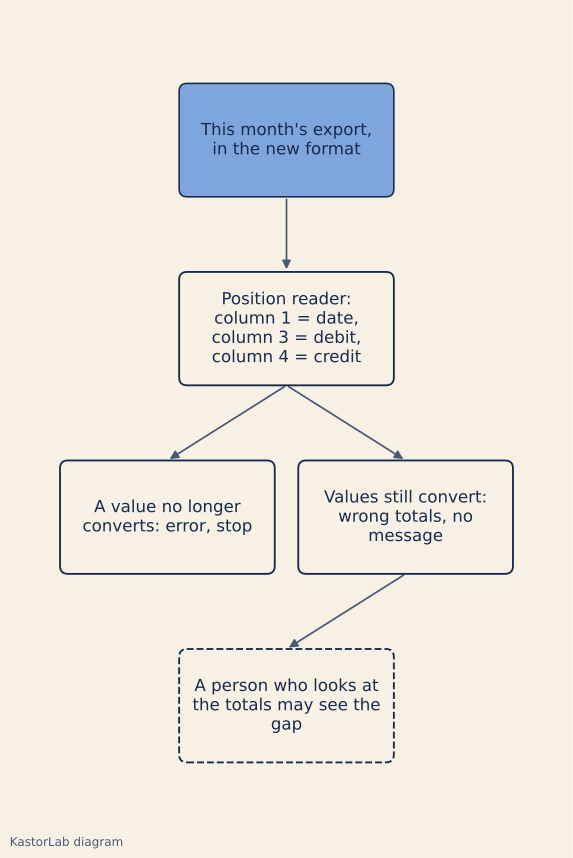
A CSV file declares little of this structure. RFC 4180 notes that there is no formal specification of the format, takes the comma as the field delimiter, provides for an optional header line, and defines neither the date format nor the decimal separator [4]. A position-based job (column 1 = date, column 3 = debit, column 4 = credit) therefore freezes five assumptions: the encoding, the field delimiter, the order of the columns, the day/month order of the dates and the notation of the amounts.
When the bank changes one of these conventions, three outcomes are possible. A value no longer converts (text where a number should be): the run stops on an error, annoying but visible. The values still convert, because two numbers stay two numbers: the total is wrong, with no message. Or the change does not concern what the reader uses: the total stays right.
The test: nine changes on a synthetic export
We built an invented bank export: 300 rows from January to June 2026, five columns (date, label, debit, credit, balance), fictitious labels, no IBAN and no real name. Its reference: semicolon delimiter (the comma serves as the decimal separator), UTF-8, dates DD/MM/YYYY. A position reader, written for that format, computes the monthly totals of debits and credits; a second one also checks its dates against a calendar. For nine changes applied one at a time, we compared the totals obtained with the expected totals (computed in cents from the original data), then the file’s structure with the reference’s.
The two readers and the comparison are scripts written for this demonstration, not Nestor’s code; no model is called; measurements of 4 November 2026. KastorLab has an interest in this topic: Nestor, which we offer, compares the structure of files before a run. So the test also says what our demonstration comparison does not see.
| Change | Position reader | Structure comparison |
|---|---|---|
| “Libellé” column renamed | Right | Flagged |
| Debit and credit swapped | Wrong, no message | Flagged |
| “Référence” column (text) added in front | Error | Flagged |
| “N° opération” column (number) before the amounts | Wrong, no message | Flagged |
| Delimiter “;” became “,” | Error | Flagged |
| Dates MM/DD/YYYY instead of DD/MM/YYYY | Wrong, no message | Not seen |
| Decimal point, no thousands separator | Right | Flagged |
| Decimal point, thousands by comma | Error | Flagged |
| Windows-1252 encoding instead of UTF-8 | Error | Flagged |
A control file, same format and limited to June, gives the right result with both readers, and the comparison sees no difference in it.
Across the nine changes, the position reader stops four times, gets it wrong three times with no message and stays right twice. With debits and credits swapped, or with an “N° opération” column before the amounts, none of the 6 monthly totals is right. With MM/DD/YYYY dates, the reader files the amounts under 31 “months” numbered 1 to 31, 25 of them outside the period of the export, and none of the 6 expected totals is right either.
The structure comparison flags 8 changes out of 9, and 2 of the 3 wrong results with no message. It also flags the renaming of “Libellé” and the decimal point, after which the position reader stayed right: it then stops a run that would have given the right total. That is the price of a comparison that does not look at what the job uses.
The second reader, which checks its dates, stops on the file with reversed dates, because 192 rows out of 300 have a day above 12 and so an impossible “month”. On a partial export from 1 to 10 June (14 rows), it gets it wrong with no message like the first one, and the structure comparison sees nothing there either.
What the structure comparison does not see
The day and month reversal keeps the same template, 99/99/9999: neither the names, nor the number of columns, nor the delimiter change. The structure says what a column looks like, not what it means: a change that touches neither the names, nor the order, nor the shape of the values escapes it.
Two checks on the values, added to the lab, catch part of it. The first checks that the month of each date is between 1 and 12: it flags the file with reversed dates (192 rows out of 300). The second checks that each row’s balance is the previous one plus the credit minus the debit: it flags the swapped columns and the column added before the amounts (299 rows out of 299 do not match the one before). Each of the nine changes sets off at least one of these three checks, structure included. The partial export from 1 to 10 June sets off none of them: the reader reports eight months for ten days of transactions, which a person who reads the totals can see.
What to check with your provider
Five questions to ask the vendor or integrator that processes your exports, with what a good answer contains.
- What happens when the format of an export changes? A good answer says that the job stops before producing a result and names what differs. If it does not tell an error from a wrong result, ask what happens to two swapped amount columns.
- What is the structure compared with: the original file, the last accepted file, something else? A good answer names the reference and says when it changes: that decides whether a change that went unnoticed one month is still flagged the next.
- What does the comparison look at, and what does it not see? A good answer lists what is compared and what is not, such as the day/month order, and plans a check on the values as a complement.
- Who approves a fix, and can it be tried on past months first? A good answer names a person other than the author, and a trial on each kept past period that lists the results that change.
- What does the model receive to propose a fix? A good answer says it is the structure difference and not the rows of your files, and that what is sent leaves a trace.
How Nestor handles it
Before a run, Nestor compares the structure of the files with the reference, the one from the build or from the last successful run. If it changed, the run stops and explains.
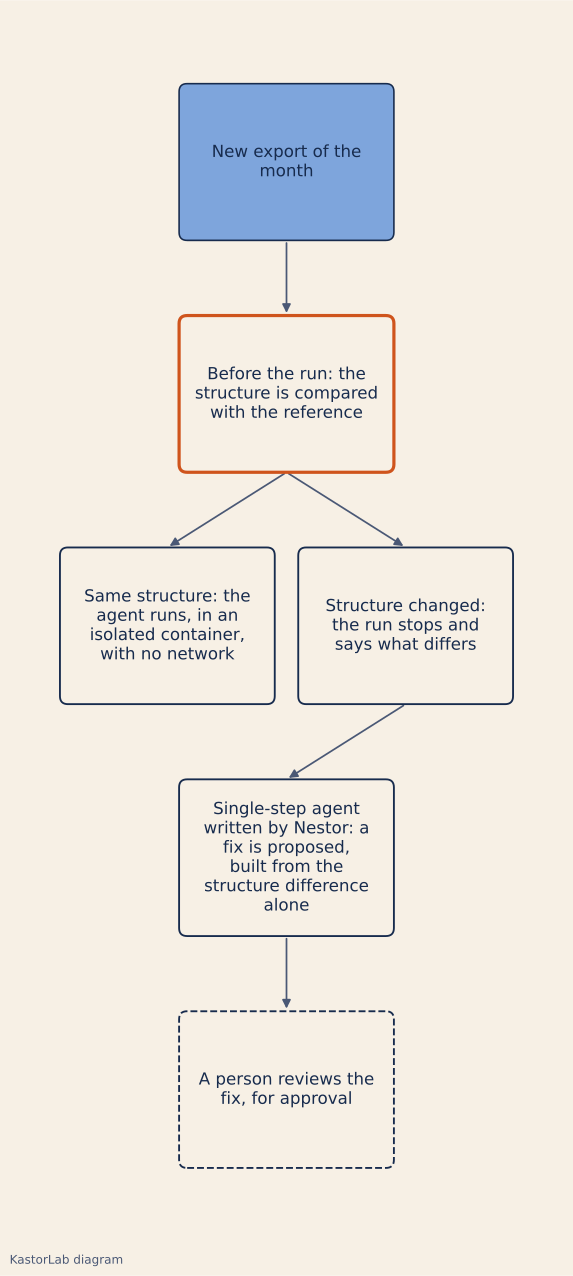
The explanation is given in plain words. For single-step agents written by Nestor, a reviewed fix can be proposed; it is built from the structure difference alone, and it is for approval. The author of an agent or of a change cannot approve it. Repairs, like changes and adapters, call a model again.
Nestor keeps a version history for each agent. A change can be replayed on the files, before and after, before it is approved, which is optional; it is tried on each kept past period, with a summary for the approver. The program, for its part, is tested: it runs on the server, and its result is compared cell by cell with the team’s, with up to 3 attempts.
Accounting is only an example here. Use cases by trade, step by step, are on the Use cases page.
Limits
The test covers a single synthetic file of 300 rows and nine changes chosen by us, one at a time, from a single reference format. The counts (4, 3 and 2 out of 9; 8 out of 9) depend on the reader and the comparison we wrote: with the second reader, we get 5 errors, 2 silent wrong results and 2 right results. “8 out of 9” measures the coverage of the dimensions where we injected the changes, not a general capability, and none of these counts says how often real exports change. We did not test combined changes, the byte order mark (BOM), line endings, total lines, negative amounts, or the Excel, PDF and OFX formats. As of 4 November 2026, the documentation of Odoo 20 lists the CAMT.053 format first, described as the format recommended by SEPA [5]; we did not try it. The three help pages are not an audit of the vendors.
The readers and the comparison are demonstration scripts, not Nestor’s code: the test says nothing about what Nestor’s comparison sees, or about its replay on a drift fix. The repair only covers single-step agents written by Nestor. We called no model: the quality of a proposed fix is not measured.
Possible follow-ups: how a person who is not a developer reviews a fix; replaying past months before approval.
Measurements were made on a MacBook (Apple Silicon, macOS 14.6), with Python 3.12.7 and its standard library. The scripts are deterministic (fixed seed); they were rerun during development, and the published figures are those of the last run.
Sources
- Erreurs courantes liées à l’importation d’opérations bancaires au format CSV dans QuickBooks en ligne, QuickBooks Online (Canada), Intuit, last update shown 22 September 2026, accessed 4 November 2026.
- Error: “Wrong date format selected” when importing bank statement in Sage Accounting, Sage Accounting (Canada), knowledge base, last modified 23 August 2023, accessed 4 November 2026.
- Error while importing bank statement, Zoho Books, knowledge base, no date shown, accessed 4 November 2026.
- RFC 4180, Common Format and MIME Type for Comma-Separated Values (CSV) Files, IETF, October 2005, accessed 4 November 2026.
- Odoo 20 documentation, Transactions, Odoo, no date shown, accessed 4 November 2026.