Security · How it works
What the model receives when it builds an agent on your files
To write an agent for your files, a model needs their structure, not their rows. What actually leaves, what still leaks, and how Nestor handles it.
By Yaniv Benichou Published on 7 min read
In short
To write a program that processes a file, a model needs the file’s structure: column names, types, formats and a few invented rows. The real rows do not need to leave, since the program is what reads them. Three things still leave: the names, the category labels and the request itself.
“No confidential data in prompts”: what the rule actually forbids
The rule is sound. A payroll export pasted into an online assistant goes to the model provider, with the names, the IBANs and the salaries. Taken literally, though, it seems to rule out any use of a model on company files.
It targets the rows first, and to write a program, the rows do not need to leave. What still leaves, the names, the labels and the request, can be confidential too: we come back to it below. For personal data, the GDPR states a related principle, data minimization, in Article 5(1)(c) [1]: personal data must be “adequate, relevant and limited to what is necessary in relation to the purposes for which they are processed”. This article describes a technical mechanism; it is not legal advice.
To write this program, the file’s structure is enough
Take a request from an HR team: every month, list the employees hired more than five years ago whose gross salary is below the median of their department. To write that program, you need to know that there is a hire date column in year-month-day format, a decimal salary column and a department column that takes five values. You do not need to know anyone’s salary, or the name of a single employee.
So the work splits in two. At build time, the model receives the request and the file’s structure, then writes the program. At run time, the program reads the real rows, without the model.
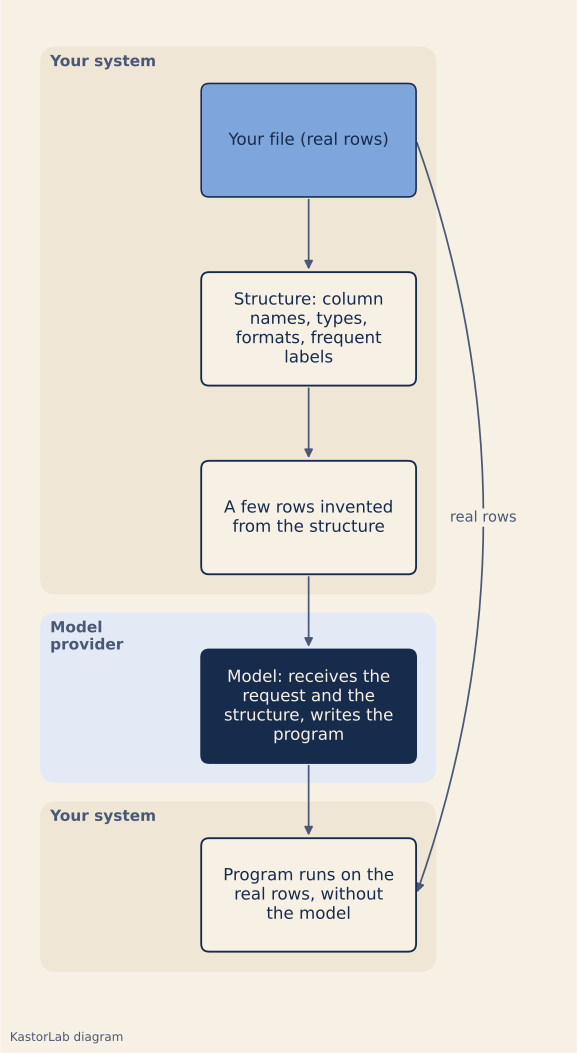
The structure keeps the shape of each column, not its content: a date becomes 9999-99-99, an identifier AAA-99999, and only the share of empty cells is recorded. One exception: the labels of a category column, such as the department name, stay as they are. The invented rows show the model what a full row looks like, for example the dot as the decimal separator. They are drawn from the structure alone, never from the file.
On a fictitious payroll export, what leaves and what stays
To check this, we wrote a demonstration script, which is not Nestor’s code, and ran it on an invented payroll export: 200 rows, 9 columns, with fictitious names, emails and IBANs. The script derives the file’s structure, generates three invented rows, then searches what would leave for every real value in the file.
The full payload, request included, weighs 2,104 bytes, against 22,117 for the file (KastorLab measurement, 3 November 2026). It contains real values of one kind only: the labels of the category columns, here the five departments, and the yes and no values of the long_term_illness column. Each of these labels is shared by at least ten rows. Apart from them, the check finds no other value from the file in the payload.
We then simulated two human errors. A real row pasted “as an example” is caught on 7 of its 9 values. The two that get through are the department, because it is an allowed label, and the no value of the long_term_illness column, also an allowed label and too short to be searched: the check ignores values under four characters. A request that reads “Same as last month, but leave out Camille Martin.” is caught on two values from the file: the first name Camille and the last name Martin. No row holds both values together: the check finds each of them on other rows.
Such a check catches gross mistakes, not all of them. A three-letter first name in the file, such as Léa, would slip past it. Conversely, because it searches for each value as a text fragment, it would flag Martine, who is not in the file, because the file contains Martin. It does not replace rereading what leaves.
What still leaves: names, labels, the request
Column names leave, and they talk. A long_term_illness column tells the model provider that the company tracks long-term illness, without a single row leaving. The name says nothing about any person’s health, but it reveals that the company processes data concerning health, one of the special categories of Article 9(1) of the GDPR [1]. The file name leaves too, and “layoff_plan_2027.csv” says more than its columns.
Labels leave. Five department names are harmless. A category column holding customer, project or site names is much less so: a frequency threshold rules out rare values, not sensitive ones.
The request leaves in full. Asking to leave out Camille Martin sends that name, whatever the file’s structure does.
So the misconception to correct is this: sending the structure does not mean nothing leaves. It means that what leaves fits in a few readable lines, which a person can reread before it is sent.
How Nestor handles it
Nestor builds its agents from the structure of the files. The model receives the request, the names and the structure of the files (columns, formats, invented rows), never the real rows. Before it is sent, the structure goes through a leak check, and you can see what was sent.
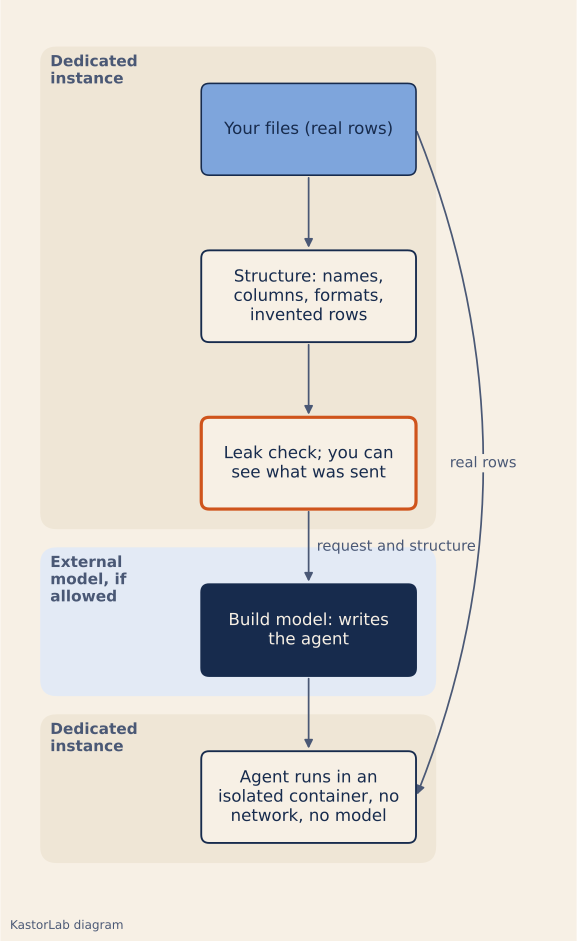
The AI writes the agent; it runs without a model. The agent runs in an isolated container with no network, inside the company’s dedicated instance: an isolated stack managed by KastorLab in the European Union, or deployed on the company’s own infrastructure with the Souverain plan. Changes, repairs and adapters, on the other hand, call a model again.
The program is tested: it runs on the server, and its result is compared cell by cell with the team’s, with up to 3 attempts. Corrections are targeted: the model receives the differences, without the values. If a file’s structure changes later, the run stops and explains what differs; for single-step agents written by Nestor, a fix built from the structure difference alone can be proposed, for approval.
For the build, we recommend Claude (Anthropic). The “internal only” mode calls no external model and runs no web search: the build then uses a local model, which is slower and may not be enough for complex tasks.
Column names and the request still go to the build model, as in the demonstration above. If you want to run this exercise on your own tools and files, it is the starting point of an audit with us.
Limits
We called no model: the demonstration shows what would leave, not the quality of the program a model would write from this structure alone. It keeps only the most frequent format of each column, and rows invented at random carry no implicit rules, such as internal codes whose meaning is written down nowhere.
The test covers a single fictitious CSV file, on a MacBook, with Python 3.12.7 and its standard library. The check compares exact strings, ignoring case: it misses a reformatted value (3,685.69 instead of 3685.69) and a paraphrase.
The mechanism only covers building an agent. In a conversation with Nestor, if an external model is allowed, each message leaves with the history, the retrieved team memories and the text of attached files; to read an image or a scan without a capable local model, the image itself leaves. The text, not the images, goes through automatic masking of some personal data (emails, IBANs, numbers). This masking is not anonymisation: what stays in clear text can still point to a person. Our Security page details what is sent.
Sources
- Regulation (EU) 2016/679 (GDPR), Article 5(1)(c) and Article 9(1), EUR-Lex, accessed 3 November 2026.