Security · How it works
What goes to the model when you chat with your assistant
On every message, the application resends the history and other text to the model. What the provider receives, what it keeps, and three questions to ask.
By Yaniv Benichou Published on 10 min read
In short
A model does not keep the conversation from one message to the next: the application resends it, at every message, everything the model needs to know. In a company assistant, that includes the history, passages retrieved from memories, the text of attached files and, sometimes, the image itself. What is sent, what the provider keeps and what the company can see can all be checked: three questions are enough to start.
What does the provider receive when you chat with your assistant?
You ask your company’s assistant a question, it answers, and you want to know what the model provider received for it. Two recent articles cover a neighboring question: why an AI forgets what you told it.
The common reading: the model has no memory of its own, it re-reads the whole conversation at every message. The article “Why does AI forget what you said (and how to fix it)” by Rohini Gaonkar, published on AWS Builder Center on 25 May 2026, puts it that way [1]. Graham Morley’s article on DEV Community, published on 20 April 2026, adds that passages retrieved from a database are inserted into the prompt alongside your message [2]. What it misses: neither covers confidentiality or logging, whereas in a company assistant, each message carries more than the question: the history, the retrieved team memories, the text of attached files, sometimes the image itself. And what leaves can be logged and flagged on the company side.
Our previous article, What the model receives when it builds an agent on your files, covered building an agent. This one covers the conversation.
The model does not keep the conversation: the application resends it at every message
Both providers whose documentation we read say so. At Anthropic, the Messages API is stateless: the application sends the full history with every request [3]. At OpenAI, each text generation request is independent and stateless; to hold a conversation, you pass the earlier messages as parameters [4].
Every message is therefore a full request: your question, the history and whatever the application fetches elsewhere. The model’s answer is added to the history and goes out again with the next message. An application can also summarize or drop the oldest messages when the conversation exceeds the context window [2].
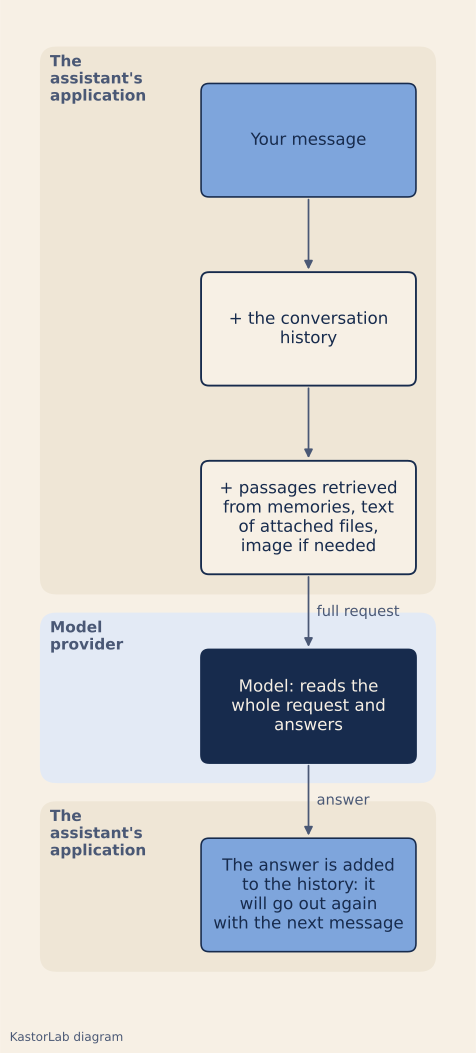
Three cases move the question rather than remove it. At Anthropic, as of 4 November 2026, message threads (in beta) keep the conversation on the server: the application then sends only the new messages, and the thread is deleted no more than 1 hour after its last use [3][5]. At OpenAI, previous_response_id chains responses, and all previous input tokens in the chain are billed as input tokens [4]; the Conversations API, for its part, keeps the state of a conversation as a long-running object with a durable identifier [4]. In all three cases, the provider holds the history.
What a conversation message carries
What is added to your question depends on the application, not on the model: the API accepts text and images, and the application decides what to put in.
| What is added to your question | What the provider receives | Condition and source |
|---|---|---|
| The history | All earlier exchanges | At every message, unless summarized or held by the provider [2][3][4] |
| Retrieved passages | The text retrieved from a memory or a database | The application adds it to the request [2][6] |
| The text of an attached file | The text extracted from the file | OpenAI: text only for a .docx or a .txt [7] |
| The image of a page | The image itself, along with the text | PDF, on models that read images [7][8] |
For a PDF, Anthropic gives Claude the extracted text and an image of each page [8]; OpenAI does the same on models that read images [7]. Two assistants that call the same model can therefore send very different things: what leaves is read in the application, not in the model’s name.
What the provider keeps, and what the company can see
What a provider does with these requests depends on the provider, the feature used and the contract, and its documentation can contradict itself. As of 4 November 2026, OpenAI generates abuse monitoring logs for all API usage and keeps them up to 30 days, unless longer retention is required by law or is reasonably necessary to protect its services; the Responses API also has a 30-day application state retention period by default, and the Conversations API lists “Until deleted” for abuse monitoring logs and for application state alike [9]. At Anthropic, two pages do not agree on that date: the Privacy Center says API inputs and outputs are deleted from its systems within 30 days of receipt or generation, with exceptions [10]; the documentation page “API and data retention” says conversation content is not retained by default, except for the models it calls Covered Models, which require 30-day retention [11]. That is a reason to ask question 2 below and to get the answer in writing.
Both offer zero data retention to some customers, with limits. At OpenAI, content is then excluded from abuse monitoring logs, but the features marked as not eligible, the Conversations API among them, may still store application state even under zero data retention [9]. At Anthropic, prompts and responses are not stored “at rest” once the API response is returned [11]; the same page adds that, even under zero data retention, Anthropic may retain data where required by law or where its automated safety systems have flagged it, for up to 2 years for a flagged chat or session, and that Covered Models are available under it only if expressly authorized [11]. Anthropic’s message threads in beta are not eligible [5].
On the company side, a log that records the content of what is sent lets the company reread what left; without such a log, reconstructing what a message sent is guesswork. What can leave is also set wherever the application allows it, by an administrator or by each user, and any masking applies only to what it is built to cover. These properties belong to the application, not to the model.
What to check with your provider
These three questions go to the vendor of the assistant, who should be able to answer for the model provider it calls as well. They hold without Nestor.
- What exactly does each request to the model contain, and can it be reread? A good answer names the history, the retrieved passages, the text of files and the images, says whether any masking covers the text and the images alike, and gives a way to reread what left for a given message.
- What does the model provider keep, for how long and for which features? A good answer gives a duration per feature (logs, conversations held on the server, files), names the zero data retention regime where one exists and lists the features excluded from it.
- Who can authorize sending to an external model, and can it be forbidden entirely? A good answer describes an administrator setting, not a switch each user can flip, and a mode in which no external model is called.
How Nestor handles it
Nestor is KastorLab’s flagship product: we therefore have a direct interest in this subject.
If the company allows an external model (Claude from Anthropic, GPT from OpenAI or Gemini from Google), each message in the conversation goes out with the history, the retrieved team memories and the text of attached files, except when the request amounts to launching an existing agent: the chat then launches that agent instead of calling a model (0 tokens, and the answer says so). To read an image or a scan without a capable local model, the image itself goes out. The text, not the images, goes through automatic masking of certain personal data (emails, IBANs, numbers…); this masking is not anonymisation. What is sent is logged and flagged in the conversation.
Team memories are retrieved by words and, if the server has an embedding model, by meaning.
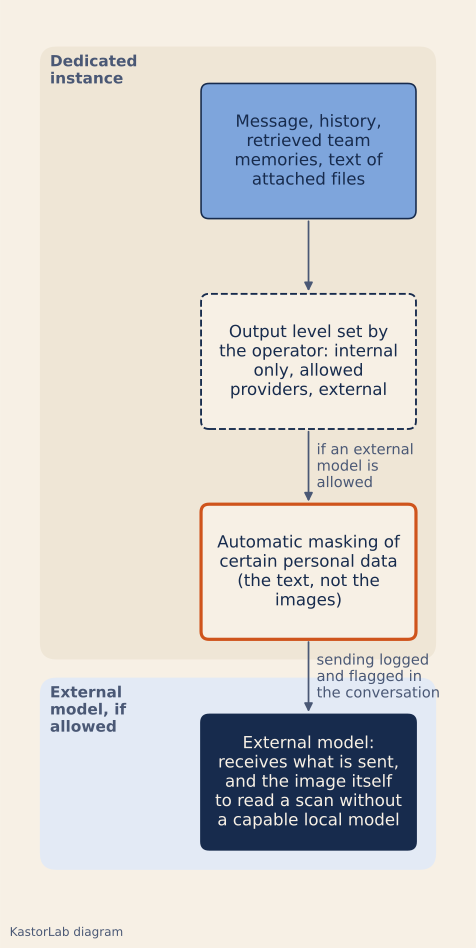
Nestor has three output levels (internal only, allowed providers, external), set by the operator, never by a user screen. In “internal only” mode: no external model, no web search. In the mode Nestor calls “zero-leak”, external providers are not even instantiated: only the models on the customer’s infrastructure answer. The text is masked before sending (not the images), with one audit line per crossing. Web search is optional: only the words of the search leave.
Nestor runs in a dedicated instance for the company: an isolated stack, managed by KastorLab in the European Union (Team and Business plans), or deployed on the customer’s own infrastructure (Souverain plan). “Closed loop” means running agents in an isolated container with no network, and the “internal only” mode; if the company allows an external model, it is no longer a closed loop. Our audit includes an inventory of your AI uses: tools, models, data involved.
Limits
We measured nothing: no call to a provider’s API, no capture of an assistant’s traffic. The facts about providers come from Anthropic’s and OpenAI’s documentation as of 4 November 2026; it changes, and other providers may do things differently.
For Nestor, this article does not say what the log records about what is sent, who can read it or how long it is kept; how the masking recognizes data beyond the examples given; how many memories come back for a message; or what happens to the text of an attached file in later messages. It does not cover connected accounts (when a mailbox or LinkedIn is connected, Nestor exchanges with that service) or voice dictation either.
Building an agent follows another path, described in the previous article: the model receives the structure of the files, not their rows. For building, the “internal only” mode with a local model is slower and may not be enough for complex tasks; we have not measured the quality of a local model in conversation. Our Security page also covers what is sent.
Sources
- Why does AI forget what you said (and how to fix it), Rohini Gaonkar, AWS Builder Center, published 25 May 2026, modified 2 July 2026, accessed 4 November 2026.
- How AI Memory Actually Works: Context Windows and RAG, Graham Morley, DEV Community, published 20 April 2026, accessed 4 November 2026.
- Using the Messages API, section “Multiple conversational turns”, Anthropic documentation, accessed 4 November 2026.
- Conversation state, OpenAI documentation, accessed 4 November 2026.
- Message threads, Anthropic documentation (beta), accessed 4 November 2026.
- Memory tool, Anthropic documentation, accessed 4 November 2026.
- File inputs, OpenAI documentation, accessed 4 November 2026.
- PDF support, Anthropic documentation, accessed 4 November 2026.
- Data controls in the OpenAI platform, OpenAI documentation, accessed 4 November 2026.
- How long do you store my organization’s data?, Anthropic Privacy Center, section “Standard Retention Timeframe”, accessed 4 November 2026.
- API and data retention, section “Zero data retention (ZDR)”, Anthropic documentation, accessed 4 November 2026.